Never miss a critical update. ShiftUp’s notification and feed system makes Account Plan and Strategy changes visible, filterable, and traceable — so you can quickly find what’s new, who it’s assigned to, and what’s most important.
Where you’ll see updates
- Salesforce bell notifications — Account Plan and Strategy owners receive bell alerts with a summary of what changed and a direct link to the updated record.
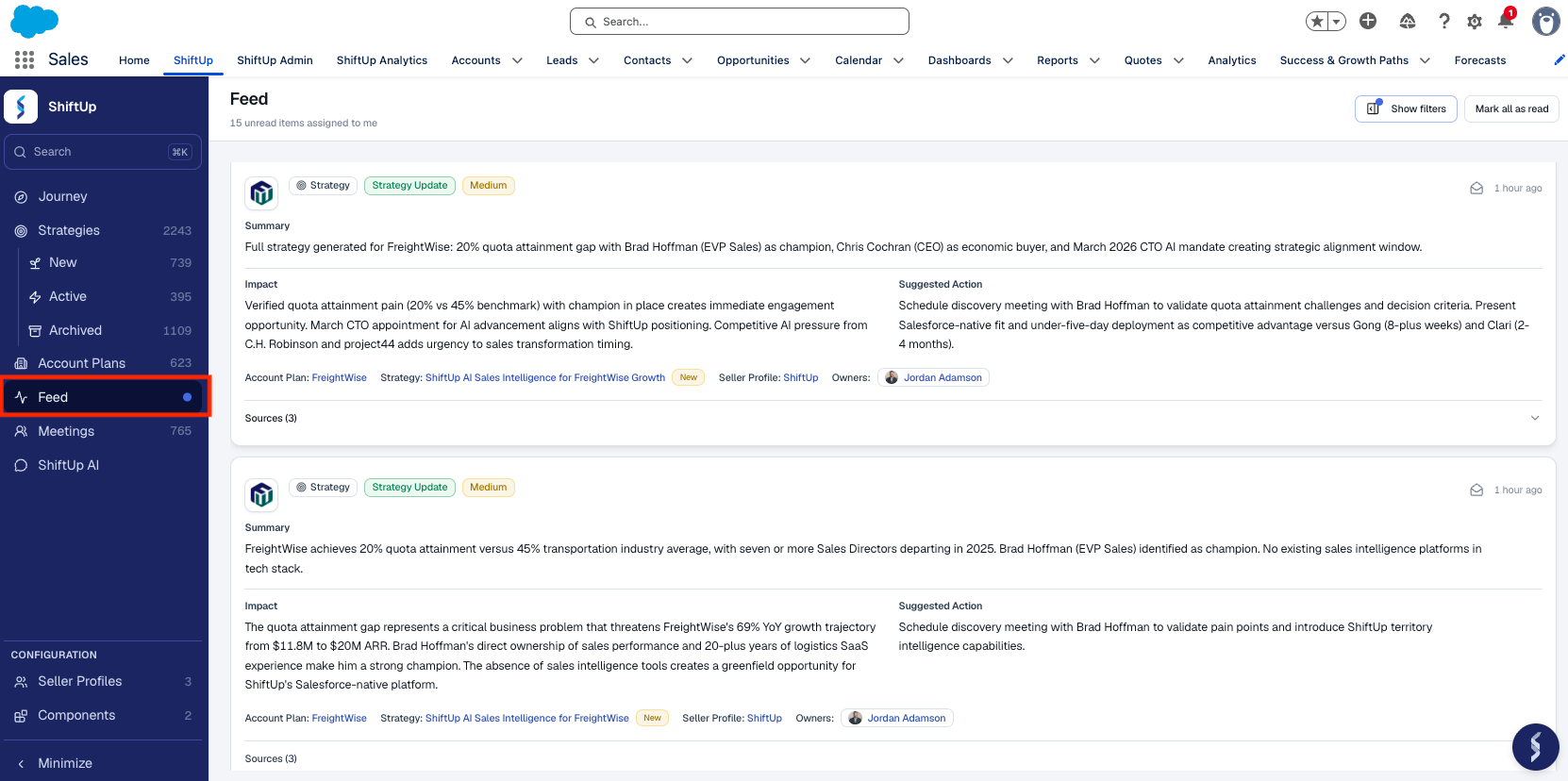
- Feed — A dedicated Feed view in the left-hand menu shows all updates across your Account Plans and Strategies. The header includes a count of unread items assigned to you.
- Record feed — Each Account Plan and Strategy has its own feed tab that shows the full update history for that record.
Reading the feed
The Feed page lists notifications newest-first and loads more as you scroll. Each notification shows:
- Type — Account Plan or Strategy. Click to open the related record.
- Category — Intelligence Update or Strategy Update.
- Priority — High, Medium, or Low.
- Company Logo - Logo of the account plan or strategy company.
- Read state — Unread items are highlighted; read items are dimmed when included in the view.
- Age - Days since the notification was generated
- Feed Content - Every feed item includes three structured sections so you can triage without opening the record:
- Summary - Description of what’s changed
- Impact — Why the change matters and what it affects on the Account Plan or Strategy.
- Suggested action — A recommended next step you can take in response to the update.
- Account Plan / Strategy Name - Click to open related record.
- Owner - The account plan or strategy owner
- Sources - The cited evidence that drove the update
Mark as read
- Mark a single item — Use the action on a notification to mark it read or unread.
- Mark all as read — Use Mark all as read in the page header to clear your unread queue in one click.
Filtering the feed
Click Show filters in the header to open the filter panel. The Feed supports filtering and search by:
| Filter | Values |
|---|
| Assigned to / owned by | Defaults to you; switch to any user to see what’s on their plate |
| Show read items | Toggle on to see read items alongside unread ones |
| Type | Account Plan, Strategy |
| Category | Intelligence Update, Strategy Update |
| Priority | High, Medium, Low |
| Date range | Pick a start and/or end date |
| Account Plan | Search for and select a specific Account Plan |
By default, the Global Feed is scoped to the unread items assigned to you. Switch the Assigned to / owned by filter to another user to triage what’s queued up for your team.
Per-record feed
Inside any Account Plan or Strategy, open the Feed tab to see only that record’s update history. This is the fastest way to answer “what’s changed on this account?” without scrolling the global Feed.